

Decloak Review - Entry Level DJ Controllers
We take a look at the latest entry level DJ Controllers on the market to try and help make sense of the myriad of choice. Pro and Cons discussed for each one to try and help you with your decision if you are thinking about purchasing your first controller.
In this series we explore what is on the market in terms of music production software & hardware and DJ equipment. Each time will aim to provide you with all the information needed to be confident in your next purchase. Join our e-mail list here to keep posted on future articles.

SUMMER 2018 Review
ENTRY LEVEL DJ CONTROLLERS
Buying your first DJ controller can be a daunting prospect with so much choice out there. Not only is it important to decide on the right brand of controller but you also need to consider the software that it will control. For the most part all the DJ softwares out there do essentially the same job, but there might be extra features that may or may not be of use to you. Most companies offer free trials or preparation modes, so it might be worth trying these out and seeing how you get on with the user interface and track analysis capabilities before making your purchase. It’s also important to note that different programs have varying minimum system requirements and these should always be considered so that your computer or laptop will be able run the programs smoothly. This article includes the versions of programs that come free with the controller. It’s usually possible to upgrade to the full versions or even get mapping for different programs altogether, so it is rare that you're completely pigeon holed after making your purchase. All prices in the article are correct regarding to www.bopdj.com July 2108.
To add value to your purchase here at Decloak we offer DJ courses in any of the listed DJ controllers below. Check out our DJ courses available here.

NUMARK PARTY MIX
£77.54 - Virtual DJ LE
The Numark Partymix is the cheapest of the options provided in this article, and you get a fair amount of bang for not so much buck. The hardware unit is small and compact and weighs just under 1kg, so will be perfect for house parties, especially as it has built in LEDs which sync to your music and give an extra dimension to your sets, that none of the other controllers in this price range offer. The Party Mix runs Virtual DJ and you get the activation code with the product. The unit features four performance pads on each side of the mixer section which can be utilised for cueing tracks, FX and even sampler mode to give your sets that unique edge. Such a compact unit does have some drawbacks though. The pitch faders are small, meaning beatmatching can be tricky and there is just two EQ controls - bass and treble, as opposed the traditional three band EQ found on most DJ mixers and controllers. All in all this is a great product for the price point, but might be lacking in features for those aspiring to get into clubs anytime soon.
For more info on the Numark Party Mix click here

Roland DJ-202 -
£219 - Serato DJ Intro
Roland are fairly new to the DJ controller game, but this should not mean they are overlooked in anyway. The main things to note here is that unlike its bigger brothers the DJ-505 and DJ-808 it does not include Roland’s now famous TR style drum sequencer, however it does still have sequencing capability. This is done by using the performance pads, which have eight modes, we won’t go into all of these right now, but they do provide sequencing capability to layer extra drum patterns over DJ sets. Roland have even included samples from there classic drum machines so you can lay beats down from the get-go. Another thing that makes this controller stand out is the MIDI out on the rear of the unit, meaning you can feasibly connect a drum machine or synthesizer and have this synced up seamlessly with the music you are playing on the controller. All of the controllers in Roland’s range boast the lowest possible latency platters meaning this product must be a serious consideration if scratching is going to be in any way incorporated into your sets. Another attractive feature for the DJ/MC is the Mic input that has studio-grade echo, gate and ducking effects.
For more info on the Roland DJ-202 click here

Pioneer DDJ-SB3
£229 - Serato DJ Intro
The DDJ-SB3 is the latest controller in Pioneer’s Serato Controller range. It is very similar in layout to the DJ-202, but where the DJ-202 boasts the drum sequencer, the DDJ-SB3 has the innovative Jazzy Jeff endorsed ‘Pad Scratch’ mode. This is a new feature that allows users to recreate scratch sounds just by pressing a pad. These sounds are synced to the tempo of the music so will always sound natural. Although there has been some backlash from scratch purists, this feature actually allows budding scratch DJ’s to realise the importance of timing and sample selection when it comes to scratching. So for those wanting to start out but without the money and or space for turntables this is a great way to begin to learn the art of turntablism. Furthermore, the Jog Wheels on this controller are aluminium (most in this price range are plastic) and super responsive so will handle genuine scratch routines with ease when in Vinyl Mode. Amongst other improvement from the previous models in the DDJ-SB range, this latest incarnation has larger pitch faders at 45mm. Other cool features on the SB3 include auto loop, key lock, FX fade, filter per channel, slip mode, ¼” jack mic input and four deck mixing.
For more info on the Pioneer DDJ-SB3 click here

Numark Mixtrack Platinum
£203 - Serato DJ Intro
The second Numark controller to feature, the Mixtrack Platinum is the latest in the mixtrack range. The main selling point here that the other controllers in this price range are lacking is the dual 1.75” LCD display screens in the centre of each jog wheel. This is a feature that will attract those that are conscious of staring at a laptop whilst mixing. There’s that now old adage of DJ’s looking like they’re checking their emails mid set, which can now be minimised with this controller as you can see information such as BPM, playhead position, key lock on/off, slip mode on/off and the time elapsed or remaining for the playing track. This can also help speed up your workflow and allow more time for actually mixing the tracks. A general gripe of controllers at this price range is the truncated length of pitch faders compared to industry standard kit. Not so with the Mixtrack platinum - the pitch faders are super long and even the more finicky DJ’s would be satisfied with them. The Mixtrack platinum also features a three band EQ, a bidirectional filter per-channel, 4 deck mixing and a strip for needle search so you can quickly and easily preview tracks.
For more info on the Numark Mixtrack Platinum click here

Pioneer DDJ-400
£249 - Rekordbox
This is the latest in the Pioneer DDJ range, and an eagerly awaited update for its predecessor the DDJ-RB. There are many improvements, most notably the increased length of the pitch faders. The layout is also improved, with the effects section mimicking that of Pioneers DJM range. This means that those looking to get into the clubs ASAP might benefit from this layout as it shouldn’t be too dissimilar to what you might expect to see in DJ booths across the world. The same goes for the loop function buttons being located at the top left of the jog wheels, which have indents on. Both of these features are inherited from the CDJ-2000NXS2 flagship player. Unlike most the controllers featured thus far that have a ‘mirrored’ layout, the DDJ-400’s deck sections are identical in that you will find the pitch faders to the right of both jog wheels, again giving the feel of a more professional club set up. This controller also features eight performance pads which can be used for beat jump, beat loop, slip loop pad FX (which are really cool) and can also utilise Rekordbox’s sampler feature. It should be noted these pads are quite small, even smaller than that of the DDJ-RB. Like other units in this price bracket there is the 3 band EQ and HPF/LPF on each channel. It should be noted that only two channel mixing is possible with the DDJ-400.
For more info on the DDJ-400 click here

Pioneer WeGo4 - £269
Rekordbox/Virtual DJ LE
You might think this controller looks a little different to some of the others. This particular unit makes DJing very accessible. It comes with licences for Rekordbox and Virtual DJ LE, however it is also compatible with Algoriddim DJ Pro. With this, all you need is an iPhone or iPad with an iTunes or Spotify Premium account (plus a half decent Wi-Fi connection) and you you will have millions of songs at your fingertips. There is no compromise for convenience here, with Algoriddim DJ Pro allowing you to manipulate tracks from iTunes or Spotify in exactly the same way you would with your own library in Serato or Rekordbox. Beat sync, key sync, looping, fx etc. are all possible, meaning hours of fun with hours of music. It must be said the unit itself feels more plasticky and less professional than it’s cousin the DDJ-400, and the layout is maybe less intuitive for some with the loop and fx being on clicky buttons around the jog wheels unlike the nice, soft tactile pads seen on most controllers. However, it is compact and portable and definitely a great choice for house party and hobbyist DJs that might not have the time to go searching for music to download or already have a large collection behind them. This is even more so with the connectivity. It works with iPhone or iPad plus Mac OS and Windows Laptops. There is a two band EQ with filter however this can be changed to a 3 band EQ within the Rekordbox settings if this is your program of choice.
For more info on the DDJ-WeGo4 click here

Denon MC4000
£359 - Serato DJ Intro
This is a two deck Serato MIDI controller for the professional DJ. Most notable about the hardware is that it is in a steel chassis so will give peace of mind to those gigging out and about regularly - the build feels as solid as a tank. Plus the pitch faders are described by Denon as ‘long throw’ and measure in at 100mm, wiping out any concerns that many people have about fiddly pitch faders often seen on the more compact all in one units. Another plus for the mobile DJ is the dual mic input with studio-grade echo effect, and “ducking” feature allowing DJs or MCs to effortlessly lay vocals to the top of the mix without having to ride the faders. The overall layout also feels professional with the full complement of three band EQ, bi-directional filter, three Serato FX on/off pads with depth knob, looping section and four performance pads, making this a contender for most comprehensive controller at this price range. It is also compatible with Traktor 2 and Virtual DJ.
For more info on the Denton MC4000 click here

Reloop Beatpad 2
£445 - Algoriddim DJay 2
The Beatpad is the most expensive controller in these reviews. It too utilises the power of modern technology with Algoriddim DJay 2, plus you get the program included in the price, along with eight performance pads that the WeGo4 dearly misses. These are however, rather strangely located above the jog wheels, braking tradition with most other controllers. Despite this, the overall build quality certainly lives up to the rugged Reloop name. The slick low profile jogs, large tempo fader, rugged fader, selector and EQ pots all have a nice, professional feel. And like many others in the list, mapping for Traktor 2 and Virtual DJ are also available so your not stuck with one program. The pads have eight different modes such as hot cues, loops, sampler and touch or jog FX, all of which will work seamlessly well with your own library or tracks loaded from iTunes or Spotify, as do the beat sync and key sync to allow harmonic mixing. This controller comes with cables to connect iPad or Android tablet to the controller and a nifty slot to hold your tablet so you can see exactly what is going on with your performance and makes viewing and loading playlists and tracks really simple. The Beatpad 2 is the king of connectivity, as it also supports iPhone, and other android system, Mac OS and Windows, making this one of the most versatile controllers on the market.
For more info on the Reloop Beatpad 2 click here
DJ Tricks & Tips : Set Programming
Part 1 of DJ Set Programming - Looking at the big picture - a few vital questions to ask before you begin preparing for your gig.

PART 1
Looking at the Big Picture
In part one of this feature we will be taking a look at the importance of set prep. For some gigs this is something that may not be so important. More experienced DJs who are familiar with their tunes will not require much planning before gigs, but that doesn’t mean they don’t do any. The first thing to do is look at the big picture before getting straight into the detail of track selection and order and this involves answering questions about the gig as a whole, such as who are the audience and how long is the set?
Let be honest, few things are as fun as jumping on the decks without a care in the world and playing some of your favourite tracks off the cuff. However sometimes you may find yourself in a situation where a little bit of prep may go a long way.
How you go about your preparation really comes down to the equipment you will be using, and it can involve as little as choosing the records you want to play in advance to fully harmonically programming a set with loops, transitions and effects.
Over the next few weeks we will be dropping hot tips from our up and coming DJ Masterclass, from choosing the right equipment for your set-up to choosing the right tracks for you podcast. With the likes of the incredibly useful RecordBox these days, prep can be extremely quick. This doesn’t always result to a quality set, however. With DJ technology advancing a rate that leaves most veteran spinners left behind with the tech they learnt on, we are going to take the tips on this feature back to fundamentals - i.e. tips that are going to be useful no matter what your choice of equipment.
Today we will be seeing what questions you should ask about your upcoming set to discover what, if any prep should be carried out.

The Context
Is the Set Live or Recorded?
Are you playing out at a gig in front of a crowd or on the radio? Or are you recording a podcast or mix to be played on the radio? This will normally decide how much prep you need to do, as something that is to be uploaded as a recorded podcast is the equivalent of writing a message rather than speaking it - it is permanent and therefore worth perfect before recording the “final draft”. Playing live, although perfection in mixing and beat matching is something desired by all DJs, small mistakes in a live DJ performance are forgettable. They only happened that one time and so long as the crowd remain the moment and the DJ recovers, all is forgiven.
From an artists point of view, however, this is not so easy to accept when it comes to mistakes whilst recording a podcast to be played (hopefully) over and over again around the world. It is only natural to want to make this as perfect as possible, and therefore prep is key to alleviating what can be an excruciatingly annoying task.
So by asking this question we know how much time in advance we need to begin our prep work. For example , if it is to be released as a podcast you might want to be starting earlier as you need to give time for mess ups whilst recording. This happens. And it is painful. But a right of passage none the less to creating a prefect podcast!

The Duration
How long is the set?
This is probably the most important detail you need to be aware of. It ultimately means “how many tunes do I need?” This is something I have been working out for a long time and it really comes down to your mixing style and the genre of music you are playing. If you prefer to mix long and slow, bring the new track in with about 2 minute or so to go of the current track, then I find 13-14 tracks per hour of set time is what is needed. I would also normally throw in a few more for good measure if I was playing a set, rather than recording a mix as things can go wrong in terms of set times and last minute decisions to play something else.
Things get a little more complicated the looser set time details become. Playing B2B for example with someone you haven't played with before would require a much broader choice of records to allow you to follow the other DJs tracks up.

The Audience
Who are you playing to?
Who is the Audience? Is it to a local crowd of familiar fans? Or is the crowd outside of your familiarity? Will you have to adapt your usual style somewhat to create accessibility to a different crowd? Depending on how much you value and commit to one particular “sound” you may not be willing to give too much leeway here, which is perfectly fine so long as you are not playing gabba at an event you were expected to play RnB at.
Of course, we all find ourselves being offered gigs that are perhaps not right for the sound we are looking to establish ourselves in. It is fine to reject gigs that will force you too far out of your own comfort zone.
It is however always good to spread your fingers into different pies when it comes to your listening, collecting and playing as a DJ, as ultimately it will only serve to give you more versatility in the long run.
-----------------------------------------------------------------
These are just a few important questions that any DJ needs to ask before he takes to the decks of an important gig. There may be further questions depending on the likes of equipments used by the DJ but fundamentally these 3 questions should be answered as it will give a lot more of an understanding to how best to approach the preparation process.
If you are interested in learning how to DJ or simply improving your current abilities behind the decks then feel free to check out what courses we have on offer at our Manchester based studio.
Next time in Part 2 we will take a deeper look into tune selection, whilst analysing each to create a sense of journey when putting them together.

Music and Gaming - 'Grand Theft Auto' (PS1, 1997)
In this series we take a look at computer game soundtracks from the past that influenced a generation of people to become fans of electronic and underground music. It is no secret that for the youth of the 80s and 90s, computer games played an integral roll in influencing and forming musical tastes. From techno to hip-hop, video games exposed the youth to music that was outside of commercial radio at the time, and long before the internet. Join us on our journey in rediscovering the best of the bunch.
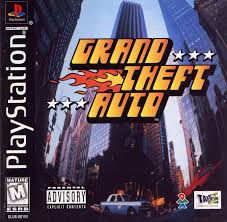
LONG, long before it was abbreviated to just 'GTA', the first release in the franchise was graphically a far-cry away from where it is now. The now infamous Rockstar Games were a practically unknown games developer before they smashed into people lives with this epic title. Sure, they were still called DMA, based in Dundee, when 'Grand Theft Auto' was released, but they became Rockstar. Not only was the game perfect for any teen of the 90's being rebellious in nature and rife in its reference to drugs, guns and gangs, the developers reputation was cemented as bad boys of the gaming world when they were faced with lawsuit, after lawsuit after lawsuit from all areas of the concerned mainstream world, from parents to priests. These mostly failed, but was a PR gold mine for Rockstar.

Even to this day and throughout the series, there are similarities that remain from the genesis of the most successful gaming series in history. The gameplay, the violence, the sheer enjoyment are all aspects that have kept each title as spectacular as the ones that came before it. But it's the music that has always remained top notch and instrumental in adding to the ambience of each time and city you find yourself in. Young adults across the world will credit GTA and the series as introducing them to classic tracks from years gone by, and we will look at these in detail in future posts on the topic.
'Grand Theft Auto', however, wasn't embellished with the huge artist roster we are familiar with in the versions later than PS1. The soundtrack was written primarily by a relatively unknown composer and producer named Craig Connor, who is credited with the entire playlist.
For only 60 minutes of radio play this was by far the most advanced and captivating reality based soundtrack of any game that came before it. It was actual radio, that switched on when you got in the car! And was a different station in different cars! WTF! Very exciting stuff as a 10 year old playing a game rated as an 18.
Hip-hop, trance, acid, break beat and techno are all evident, along with a quirky country number that was always playing in the pick-up trucks.
Reminisce, people...
Music and Gaming - OctaMED (Commodore Amiga)
In this series we take a look at computer game soundtracks from the past that influenced a generation of people to become fans of electronic and underground music. It is no secret that for the youth of the 80s and 90s, computer games played an integral roll in influencing and forming musical tastes. From techno to hip-hop, video games exposed the youth to music that was outside of commercial radio at the time, and long before the internet. Join us on our journey in rediscovering the best of the bunch.
Stepping outside of the standard agenda of this series, today we take a peek at an absolute revolution in the use of home gaming consoles and electronic music.
If you think Ableton looks confusing, the below image shows the equivalent back in the early 1990s.

OctaMED was a music production suite designed for the Commodore Amiga console.
The distinguishing feature of MED and OctaMED in comparison to other music trackers on the Amiga was that MED and OctaMED were chiefly used by musicians to create stand-alone works, rather than by game or demo musicians to make tunes that play in the context of a computer game or demo.
In others words, the entire bedroom producer culture was born out of this software and its limited, yet brilliantly used capabilities.
It only had 4 Channels to work with, and graphically there was a rather daunting interface, making Ableton today seem like a dream.
Here is a video showing a track produced on the software playing by heavyweight Jungle/DnB legend Aphrodite.
DJ Aphrodite who was also part of Urban Shakedown, used two Amiga 1200's running OctaMED to create a range of his early hits such as "Dub Moods", "Summer Breeze", "King Of The Beats", joint productions with Micky Finn such as "Bad Ass" and the remix of 'The Jungle Brothers'-"True Blue" and also including his first album, Aphrodite.
NOTE- The stereo field is pretty messed up. (For reasons we won't bore you with here)

Music and Gaming - WipeOut (PS1)
In this series we take a look at computer game soundtracks from the past that influenced a generation of people to become fans of electronic and underground music. It is no secret that for the youth of the 80s and 90s, computer games played an integral roll in influencing and forming musical tastes. From techno to hip-hop, video games exposed the youth to music that was outside of commercial radio at the time, and long before the internet. Join us on our journey in rediscovering the best of the bunch.
Last time we posted about the 'G-Police’ soundtrack from the Sony Playstation 1, but this week we feel we have to talk about the game series with the most pounding of soundtracks of all time which gave it classic status as the series that embraced the harder forms of electronic music, Wipeout.
The description for the title reads "Ballistic Antigravity Racing", and the soundtrack couldn't any more perfect. Fast, acidy, pounding, rolling, racing ballistic AF techno... it melted my tiny mind then and it does so even more now.
If you grew up as a kid in the 90s and now listen to techno, there is a good chance this is the reason why... with tracks by The Chemical Brothers, Leftfield and Orbital it is absolutely no surprise. If you have never heard of WipeOut then I suggest you play it. But for now, enjoy the noises...
TRACKLIST:
00:00 Intro
01:16 Cairodrome
08:44 Cardinal Dancer
16:01 Cold Comfort
24:10 Doh T
32:27 Messij
40:16 Operatique
48:57 Tentative
57:06 Transvaal